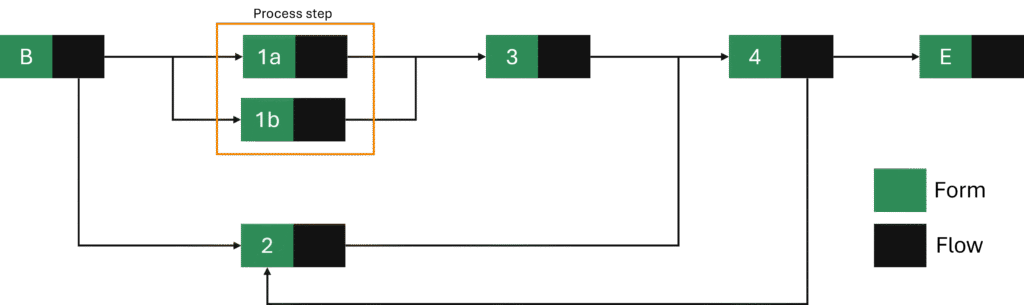
All distributions must offer an easy implementation of a specific test process. This page describes this test process and a visual representation is shown below.
Activities
The test process consists of 6 process steps and 7 activities. One process step has two activities (1a and 1b). The process starts with activity Begin (B) and ends with activity End (E).
Activity 3 is started only when activity 1a and 1b are both closed.
Forms
The form of activity Begin contains a field for all possible input field types. More details are shown in the table below.
| Field type | Title | Memo |
|---|---|---|
| account | Account | required |
| date | Date | required |
| number | Number | required |
| select | Select | required |
| textinput | Text input | required |
| textinputmultiline | Text input multiline | *) required *) multiline: 96 |
More details on the checks to perform on the fields are shown in the table below.
| Field | Check | Memo |
|---|---|---|
| Account | *) checkNotEmpty | |
| Date | *) checkNotEmpty *) checkTodayOrLater | |
| Number | *) checkNotEmpty | |
| Select | *) checkNotEmpty | |
| Text input | *) checkNotEmpty | |
| Text input multiline | *) checkMaxLength *) checkMinLength *) checkNotEmpty | *) maxLength: 20 *) minLength: 10 |
The field of field type “select” has the following values:
- Choice 1
- Choice 2
- Choice 3
- Choice 4
The form of activity 4 contains a field for all possible field types. More details are shown in the table below.
| Field type | Title | Memo |
|---|---|---|
| account | Account | |
| date | Date | |
| number | Number | |
| select | Select | |
| text | Text | variable: {{text5} |
| textinput | Text input | required |
| textinputmultiline | Text input multiline | multiline: 192 |
More details on the checks to perform on the fields are shown in the table below.
| Field | Check | Memo |
|---|---|---|
| Date | *) checkPast | |
| Number | *) checkIsWholeNumber *) checkMaxValue *) checkMinValue | *) maxValue: 7 *) minValue: 3 |
| Text input | *) CheckNotEmpty |
The field of field type “select” has the following values:
- Choice A
- Choice B
- Choice C
All other activities have an empty form.
Roles
The following activities have a custom role:
- Begin
- 1b
- 3
- 4
User
The activities without a role must be assigned to an account. The account to use must be configurable.